Friday, May 10, 2013

Limited only to imagination... IGL


IPL - the grand success. Being repeated year after year. Whether you like the new game or not, anything that makes money rolling is 'good'. Even inferior product owners are going home rich riding on the IPL wave. So successful that other countries are following suit with their own Country Leagues. With the dawn of every IPL season - economy booms, share market bulls and not to mention rising spirits of the countrymen and women (at least they have something to talk about - hearty communication are so rare these days).

Now let’s analyse what went right. More importantly, can this success be repeated with something else. Think out of the box. Shed your inhibitions.

Presenting the Indian Goti League…

For the more 'cultured' population, 'Goti' is a game of marbles, typically played on the streets. Many consider it uncool, uneducated, LS. And thats ok. Its a free country, isn’t it?

What makes IGL worthwhile. For starters, it’s a great sport. People who have played it, would vouch for it. There is passion, there is stake, there is strategy, there is tragedy, there is vibrance, there is pain, there is allegiance, there is intensity – a game of Goti has all elements of a block buster.

Next, especially for the doyens of our society, the roots of this game are pretty close to us. Going by the historians, it likely started in Harappa and Mohenjo-daro. Yes sire! But then, could a game like IGL go global? Yes, that too! Goti was played by the Romans and Egyptians. Matter of fact, it is widely played in Canada, Australia, United States, Germany, Taiwan apart from the alleys of Urban India. Goti even has a world championship hosted in England every year since 1932.

Now that we have the teams and the players, the next is the audience. Lets see. If the daily soaps and reality bites have got our country men and women hooked, a ‘fierce’ game Goti can surely be a good bait. Give them something remotely interesting and challenging with a dash of ‘color’, they will make it their religion.

Next, ‘show me the money’! Going by the lines of IPL, advertisers are today willing to shell out dough like the end of the earth. They are ready to cough out any fees, just to get ‘your’ 5-second attention. Events, merchandise – money rolls everywhere. Are they really interested in the context (the game)? No. Their interest is only on your attention span. You, on the other hand, would be surely excited about your national game.

Sportswear companies would roll out finger bands, instead of wrist bands. New camera angles would be devised. On-Stump camera would be replaced by In-Hole camera. Fingers would now be insured instead of foots and arms. Possibilities are endless, limited only to imagination.

Now lets look at IGL from another angle. The ‘best’ players of the game are the so-called gundaas and mawalees (read, the dark alleys of our ‘gullies’). We are gonna give them to a chance to go ‘legit’. The younger generation would focus their attention towards ‘making it large’; and the elder generation could just as well be that ‘kick-@$$’ coach. Most of them would trade their gory professions for ‘the’ IGL and its associated glory. Imagine the ‘new society’ that would be born from this change. Mothers would not scream at their kids for playing Goti, instead fuel their ambition by providing long undisturbed practice sessions. IGL could one day fully cleanse the world of its grim. Now that’s what we call a ‘Catalyst of Social Change’.

Friday, April 1, 2011

Gmail motion ...

Usually when Google introduces something, they means business (well :=) except for 'wave'). I just noticed the new offering from Gmail called 'Gmail Motion'. At the outset, dont go by the name... that probably is not the best. But looking into what it is, makes your eyes open up. You immediately know that it's the step of computer usage. Though Google says it has been working on it for a long time and has tested it, I still havent concluded whether it is a great product. But one thing is for sure... the technology holds a great promise and it HAS future. See for yourself (see the video first).

Thursday, March 17, 2011

Did u hear about the "Asians in the Library"?

Youtube... a medium to express. Proving beyond words... here is an episode that really got me hooked.

A few days back, a student at UCLA California uploaded a video... a message with a purpose... an opinion. Within hours there were party poopers, comedians, john "lay-on-the-couch", musicians, "the-girl-next-door", martians... a whole of people policing what she says. What was interesting though (apart from the opinion itself), this global medium threw open gates for discussion, counter attacks and creativity.

Enjoy the ride below and see how the internet today unites people from varied backgrounds and interests into one common platform of thought.

Here is the original video posted by the lady student.


And this is what happens next. Do go up to the last embedded video... u'll enjoy it =)

First a spoof...


Then another interesting one...


By far the most creative ones :) ... urge you to see it in full screen and with good speakers or headphones!


And the REMIX!!


Some serious arguments


Some lighter ones...


And finally this...


can be found here on abcnews.

And the others... nevertheless ;)

http://www.youtube.com/watch?v=8w5-2_E_PgE&feature=related
http://www.youtube.com/watch?v=zAM4Ym1UjAA&feature=related
http://www.youtube.com/watch?v=P16lkPvm0B0&feature=watch_response
http://www.youtube.com/watch?v=_LO2YOBxm_Q&feature=related
http://www.youtube.com/watch?v=ulPDxO6vz8Y& (radio talk show)
http://www.youtube.com/watch?v=8w5-2_E_PgE&feature=related
http://www.youtube.com/watch?v=eKpf9YT4x8o&feature=related
http://www.youtube.com/watch?v=nqqvlXasBfk&feature=related
http://www.youtube.com/watch?v=PV7oSnXp3yQ

ps. The guy on the guitar was Jimmy Wong. Here is another of his works ... no instruments used !! :)

Monday, August 16, 2010

Playing with Excel Worksheet Change event

Workbook sheet change is a very good place to put your code if you want to track user actions. Depending on user action, you may want to write validations or database round trips. It can also be a substitute for "formulas" if written correctly. But it is easy to overlook scenarios and user interaction patterns, and make mistakes in coding.

A good way to begin is by creating sub routine to manage your operations on the Excel sheet. This is a global sub that can be called to set when some "controlled" system operations are going on. (System = your code).

The following code can be placed in a public module.

Option Explicit

Public bSystemUpdating As Boolean, oLastCalulation As XlCalculation
'Flag to indicate start of system update

Public Sub ManageSystemUpdate(bStartUpdate As Boolean)
If bStartUpdate Then
    
    If bSystemUpdating Then Exit Sub
    'Exit if update by system already started
    
    bSystemUpdating = True
    oLastCalulation = Application.Calculation
    ' Store Calculation mode for reseting when done
    
    Application.Calculation = xlCalculationManual
    
Else

    Application.Calculation = oLastCalulation
    bSystemUpdating = False
    
End If

Application.EnableEvents = Not bStartUpdate
'To disable Excel events like Worksheet change

Application.DisplayAlerts = Not bStartUpdate
'To disable Excel alerts like "Delete Sheet confirmation" etc

Application.ScreenUpdating = Not bStartUpdate
'To disable Excel screen updatation... Excel will update the screen on completion of your routine

End Sub

What next? Now we take the "Workbook_SheetChange" event and add our custom code into it. Remember, the "Workbook_SheetChange" event gets fired everytime any change happens to the cells, i.e., including your code. So it is important to manage the re-firing of these events in case you make updates. This can be done by setting a global variable to flag the start of a system update.

Option Explicit

Private Sub Workbook_SheetChange(ByVal Sh As Object, ByVal Target As Range)
If Not Application.Intersect(Application.Range("Sheet1!A:A"), Target) Is Nothing Then
    'Only if any cell in the column "A" changes
    
    FetchFooValues Target
    
End If
End Sub

Public Sub FetchFooValues(oRange As Range)
Dim lCtr As Long

    ManageSystemUpdate True
    'Disable all events as well as all updates and calculation by Excel application
    
    For lCtr = 1 To oRange.Rows.Count
        Application.Range("Sheet1!B1").Offset(lCtr - 1).Value = FetchSingleFooValue(Trim(Application.Range("Sheet1!B1").Offset(lCtr - 1).Value))
    Next
    
    ManageSystemUpdate False
    'Enable all events
    
End Sub

Private Function FetchSingleFooValue(sInput As String)

'Do some operation here
FetchSingleFooValue = sInput

End Function

All done!

Thursday, August 12, 2010

Excel Template

Time and again, we create new Excel files with VBA, and end up rewriting our prized VBA codes (or copying pasting at best) that could be reused. Some of us have our own sleeveful of Excel files containing VBA codes.

There are some good ways of organizing (and growing) them. The most obvious way would be something like in Word... "normal.dot". In Excel unfortunately, such a thing does not exist. But we could do something close. Make a template file that could be used as a standard from the default "New Workbook" dialog.

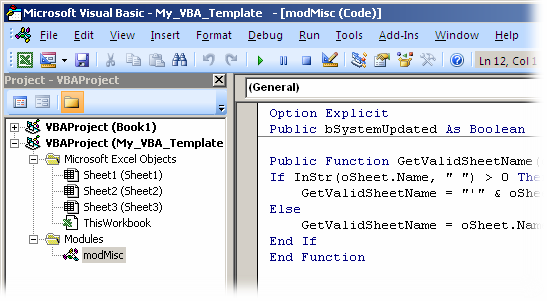
Write the VBA codes in a new Excel file and save it as a Template, say "My_VBA_Template". The VBA code could be written anywhere as usual - as new modules or written as workbook/worksheet events.
Remember to save the file as a "Macro-enabled Template (.xltm)". You can now place the file in any of the following locations depending on the usage:
  1. C:\Program Files\Microsoft Office\Office12\XLSTART\  -or-
  2. C:\Documents and Settings\<user>\Application Data\Microsoft\Templates\
Now start Excel normally and open a new workbook. Choose the "My Templates..." from the access panel.

From here, choose the your template "My_VBA_Template".

A new file with the embedded macros would be created "My_VBA_Template1" (just like "Book1" normally).

For all future uses, a good thing is that, your templete would appear in the Recent Templates section and hence much easier to access.

Happy Excelling!

Wednesday, August 4, 2010

Unlock a VBA password protected Excel file

Ever felt the need to open a VBA protected excel file... maybe one of your old files that contained an excellent routine! How do you come out of that pain?

Important: This article is for educational purposes. Try this method for opening ONLY your own files, as I did too!

So how does Excel store the file contents - cell data including formulas and formats, conditional formatting, VBA code, etc. etc. Lets investigate. Create a new Excel file MyTest.xlsm and enter some dummy test data in the first sheet. Add some formulas and conditional formatting (if you want to really understand the details).
Let us now see how excel stores this data in the file. Open the file in notepad or a hex editor. Did you notice the first 2 characters? "PK". So Excel compresses its file contents. Now we know why there is not much difference if you compress an Office 2007 file.
Lets look into the compressed contents. Rename the file extension from .xlsm to .zip
Open the MyFile.zip file. Wow! its an extensive structure with xml files to store the workbook, worksheets, calculations, sharedstrings, etc.
This is how the XML of the Sheet1 looks
Lets explore more. Lets go back to our original file and add some VBA code to it.
Add a password and protect the VBA code.
Save the file and redo the same steps as earlier to open the xml file structure. We now have another XML file called vbaProject.bin. This is the file that I need to recover. Lets investigate further. Open this file in a Hex Editor (there are lots of free ones out there... the one I use is Hex Editor Neo at http://www.hhdsoftware.com/Products/home/hex-editor-free.html).
Search for the keyword "DPB" in the content. Remember to find it just above "[Host Extender Info]".
Once found, replace the string "DPB" to "DBx" and save the file. Now replace the edited "vbaProject.bin" file and place it back into the compressed file collection (replace with the old one). Rename the compressed file back to ".xlsm".

Try to open the file in Excel. It gives an error saying that the file contains an invalid key DBx. Hit Yes and proceed. The file opens. So far good. Now go to the VBA editor.
Next it gives another error "Unexpected Error". Proceed again by hittng OK
VBA Editor opens. Now try to open the module code. Again the "Unexpected Error". Dont lose heart... we are just there. Save the file and close it. We are all set. Your file is as good as new without the VBA password. Go check for yourself!

So Excel may NOT be encrypting the VBA file after all, rather it is only setting a flag to lock the VBA content. This is evident because we can still see the code in the vbaProject.bin file (that we had written in the VBA earlier).
Some more interesting bits. Check how Excel stores its file contents. Look into the file sharedStrings.xml. It stores the strings at a global level, not in the sheet itself. Also look into how it stores the formulas and formatting. Try out things like like dragging a cell content (like Area 1) into 5 cells (producing Area 1, Area 2, Area 3...) and see how it stores the values... using ranges.

That also says that, it may be better to access Excel data directly from these XML files rather than through the Excel application model. We could have much more control and simplified logic for storing (for instance in database), transporting (eg client machine to server), opening and displaying simple content. Many possibilities here...

Well, I was pretty pleased that today I learned something new... and an unlocked VBA code.

Saturday, March 27, 2010

Business of Software Conference 2008 (Part 2)

Excerpts from lecture by Dharmesh Shah, OnStartups.com
  • At startup, your idea may "suck"... get started!
  • Say "NO" to venture capital
  • Target liquidity
  • You don’t have to go out there and market (broadcast) to get people interested!
  • Real EV of raising venture capital is high (add difficulty in getting one)
  • Nobody reads Business plans... rather write a blog!
  • All startups should be embarrassed about their product when it goes out into the market... If you are not embarrassed, you have waited too long!!
  • Don't depend on advertising to sell your product
  • You are not gonna be able to get the "pricing" right anyway... so just pick one
  • Starting as early as possible and "charge" as often as possible
  • SAAS - You are now the customer
  • COCA - Cost of customer acquisition
    • = Money spent to get a new customer onboard
    • = (Total cost of sales + marketing/Number of new customers) - lifetime value of the customer (LTV)
    • Therefore, one of the biggest success factors - lower attrition rate
  • CHI - Customer Happiness Index - Probability of customer that he will stay next month
    • Above can be correlated with (and hence should be monitored closely)
      • Did the customer use the software, usage patterns (e.g. customers who use "a" feature are 4 times more likely to stay than who don’t
      • Track usage data - by feature... who recommend it + which customers used it and how many left + who approved it
  • Don’t do "partnerships"
  • Go to the market even before you have written the first line of code
  • Manage Risks - technology risks, market risks
  • Try and reduce market risk as early as possible
  • "Pay per click" is a morphine drip